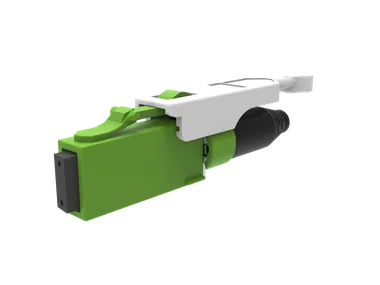
Connector
AirMT Connector
The main AirMT patching connector: non-contact MT ferrule, push-pull tab and lower mating force than MPO, in 12 or 24 fibre.
- Multi-fibre
- Push-pull
- APC
Click the photo to enlarge
AirMT non-contact MT connectors
A behind-the-wall AirMT non-contact connector in 12 or 24 fibre, with loss that stays stable over many matings and little cleaning.
The AirMT Junior connector is a behind-the-wall AirMT in 12 or 24 fibre, built around the manufacturer’s non-contact MT ferrule. Because the ferrules do not touch, loss stays stable after many matings with little cleaning. It suits patch panels and cassettes where the connector sits inside the enclosure.
| Type | Behind-the-wall AirMT connector |
|---|---|
| Fibre count | 12 or 24 fibre |
| Fibre type | Single-mode APC |
| Typical insertion loss | 0.20 dB (SM APC Low Loss) |
| Maximum insertion loss | 0.50 dB (SM APC Low Loss) |
| Return loss | At least 55 dB |
| Operating temperature | -40 to +75 C |
| Durability | 500 matings |
| Ferrule | Non-contact MT, springless design |
Figures are the manufacturer's published values for the product family and grade; check the data sheet for the exact part number you order. Radix confirms the build in your quote.
| Fibre count | 12, 24, or other on request |
|---|---|
| Packaging and labelling | On request |
Radix supplies this part loose, or built into patch cords, pigtails and assemblies to your drawing, quoted by form, phone or WhatsApp from Pune.
Send us:
Add this part to your list, add more parts, then send one request.
The AirMT Junior connector is the compact, behind-the-wall member of the AirMT family. The manufacturer lists it as "behind-the-wall AirMT; 12/24F". That wording places it inside the enclosure, where it connects the fibres of the rear cable to the back of a panel or cassette adapter, and not on the patch cords that people unplug every day.
AirMT is the manufacturer’s non-contact MT ferrule technology, licensed from Sumitomo Electric Industries, with the trademark jointly owned by the manufacturer and Sumitomo. The ferrules in a mated pair do not touch. The manufacturer says insertion loss and return loss stay stable after many matings with minimal cleaning. You will find this connector under the AirMT connectors hub. Radix can supply it from loose or built into assemblies to your drawing.
A conventional MPO presses two polished ferrules together under spring force, and the fibres are in physical contact. An AirMT pair is aligned by the body and pins, but the end faces stay a small, controlled distance apart. With no contact there is no scratching of the glass, and a small piece of dust is less likely to be trapped between two hard surfaces.
The trade is optical. A small gap needs an angled polish to control back reflection, and the manufacturer gives its AirMT figures for single-mode APC. The idea of angled polish is explained in the UPC vs APC guide. The gap also means the connector is springless, which the manufacturer lists, so mating force is lower than a typical MPO.
| Item | What the manufacturer states |
|---|---|
| Fibre count | 12 or 24 |
| Typical insertion loss (SM APC Low Loss) | 0.20 dB |
| Maximum insertion loss | 0.50 dB |
| Return loss | At least 55 dB |
| Temperature range | -40 to +75 C |
| Durability | 500 matings |
| Other | Vibration resistant, springless |
| Role of this part | Behind the wall |
Typical loss is not a guarantee for a particular assembly. Use the maximum value when you build a link budget, and read insertion loss vs return loss for how the two figures behave.
Inside a high-density cabinet there are two kinds of connection. The ones in front are touched all the time by technicians. The ones behind the panel are set once, and then left. For the rear side, what matters is small size, stable loss and low risk in installation. That is the niche for this part.
Compare the two options in the family: the AirMT connector has a push-pull tab for the front-of-panel side, and the Junior is meant for the inside. The stackable PCB version is the MBMC stackable connector. The adapter that holds the front connectors is the dust shutter adapter.
AirMT is a different optical system from a standard MPO. Do not assume that an AirMT connector mates with an MPO. Ask in the quote which adapter and which mating partners are needed, and expect to buy AirMT parts as a set. Where a link must go from AirMT to MPO, use a cord with AirMT on one end and MPO on the other, so each end meets its own kind. Fibre count and polarity still need planning; see the MPO polarity guide for the logic that carries over.
Assume a patching area has cassettes where a 24-fibre trunk lands at the rear, and 12-fibre ports face the front. Assumed values: 10 cassettes, 2 trunks per cassette.
The numbers are for method. Replace them with your cabinet counts.
Behind a panel the space is tight and access is poor. Sketch the rear of the cabinet before you choose the connector: how the trunk enters, where it is clamped, where the connector sits, and how much slack is stored. A behind-the-wall connector reduces the volume taken up, but the cable still needs its bend radius, which the bend radius calculator can check.
Strain relief matters more than usual. A connector that sits at the back of a cassette sees the weight of the trunk on every service visit. Clamp the trunk to the frame a short distance before the connector so that the pull never reaches it.
A rear connector should rarely be moved, so a high mating count is of little use there. What matters more is that the connector does not need to be opened and cleaned. The manufacturer’s statement that loss stays stable with minimal cleaning is the real saving. Every visit to a rear connector costs a technician's time, a risk of dislodging a neighbour, and a risk of contamination.
When you compare the Junior connector with a conventional MPO for the rear side, include the labour of future inspection in the comparison, and not just the price of the part.
A trunk with factory-fitted connectors needs a protective sleeve for pulling, and a pulling grip that loads the cable and not the connector. Ask for the sleeve outside diameter, and compare it with the duct. Keep dust caps on until the connector is at its destination, and make the first mating the day the connector is inspected.
Put the answers in the project file with the order. They will be asked for again when the cabinet is audited, and finding them takes less time at the start.
When the quote arrives, check that it states fibre count, fibre type and polish, cable outside diameter, length, boot colour and the mating partner for every line. Ask which data sheet applies and whether loss values are typical or maximum. If anything is left to assumption, say so in writing before you place the order, since a rear-of-cabinet connector is costly to change once the trunk is pulled.
Also confirm how the assemblies will be labelled at each end, because rear connectors are hard to identify later.
Browse the these connectors section, or send your layout with a quote request.
It is a behind-the-wall AirMT connector in 12 or 24 fibre, using the manufacturer’s non-contact MT ferrule. It sits inside enclosures and is not meant for daily patching.
The ferrule end faces do not touch when mated. The manufacturer says loss stays stable after many matings with minimal cleaning.
The manufacturer gives a typical 0.20 dB and a maximum of 0.50 dB for single-mode APC Low Loss. Use the maximum in link budgets.
The manufacturer states at least 55 dB for AirMT in single-mode APC.
Plan on AirMT mating with AirMT. For a link between the two types, use a mixed cord.
The manufacturer states 500 matings, with an operating range of -40 to +75 C and vibration resistance.
The manufacturer’s figures for AirMT are for single-mode APC. Ask us to check multimode before you plan it.
Radix can supply it from loose or built into cords and trunks to your drawing. Quote by form, phone or WhatsApp from Pune.
Connector
The main AirMT patching connector: non-contact MT ferrule, push-pull tab and lower mating force than MPO, in 12 or 24 fibre.
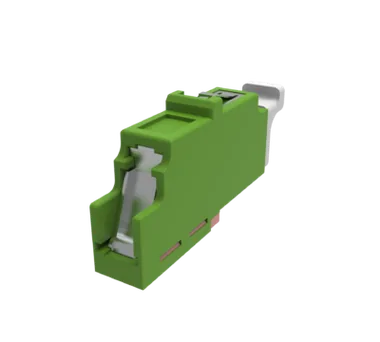
Adapter
The panel-side adapter for AirMT links, with a hands-free shutter that closes by itself when no connector is in the port.
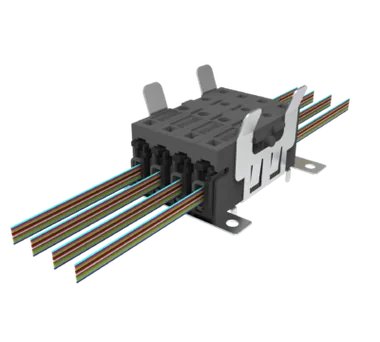
Connector
A stackable, high fibre count AirMT connector for PCB mounting in 12 or 24 fibre, for equipment makers with many channels at a board edge.
All airmt non-contact mt connectors or browse the full connector range
Send the part, quantity and drawing. An engineer replies with questions or a quote.
Fill in what you know. An engineer replies from sales@radixfibrotech.com, Monday to Friday, 09:00 to 18:00 India time. Prefer to talk? Call +91 99702 02526.
Your reference is . A confirmation is on its way to your inbox. We reply from sales@radixfibrotech.com, Monday to Friday, 09:00 to 18:00 India time.
Urgent, or have a drawing? Send the reference on WhatsApp and we will pick it up there.